The 4 orchestration models of NEO
This guide explains, with no need to know how to code, the 4 different ways in which automated QA work can be started and run in this system.
All the models use the same basic tools (the "skills": read a story, put together a test plan, explore the app, generate tests, run them, report). What changes from one model to another is who decides what to do and in what order, as well as who is in charge of running it.
1. Two separate questions (the key to understanding them)
Before looking at each model, you need to understand that two different questions are actually being answered:
| Question | Possible answers |
|---|---|
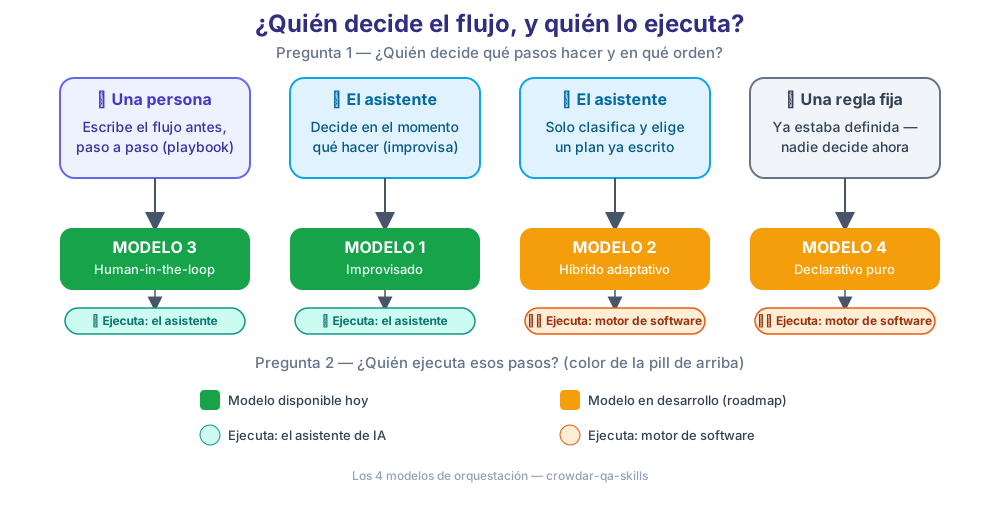
| Who decides which steps to take and in what order? | A person · The AI assistant · A fixed rule written in advance |
| Who is in charge of running those steps? | The AI assistant · A software engine (code) that follows instructions to the letter |
Think of it like ordering food at a restaurant:
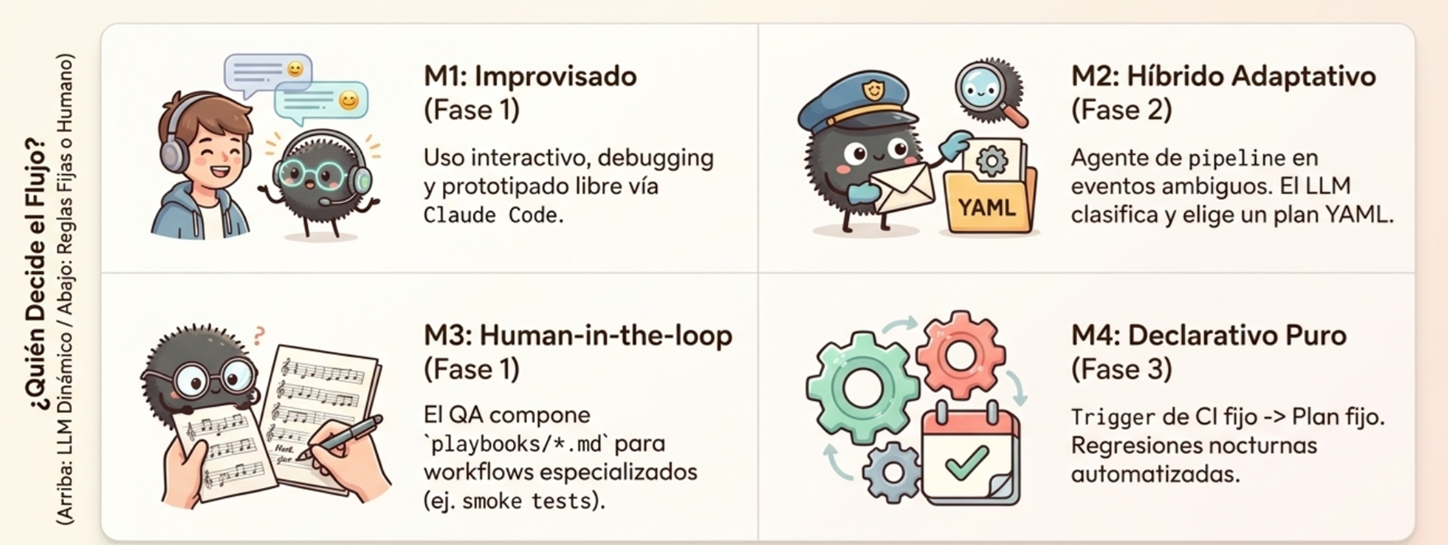
- A cook improvising with whatever is in the fridge: they decide the menu themselves and cook it themselves. It can turn out differently every time. This represents Model 1.
- A counter with protocols: the person serving you listens to your order and routes it to protocol A or B, already written; from there, everything follows that recipe without making anything up. This represents Model 2.
- A printed recipe that someone follows by hand: a human decided the steps in advance, and someone (or something) checks them off one by one. This represents Model 3.
- An automatic traffic light: nobody decides anything in the moment — the rule is already set in advance and is always applied the same way. This represents Model 4.
2. Summary table of the 4 models
| # | Model | Who decides the flow? | Who runs it? | Status in NEO |
|---|---|---|---|---|
| 1 | Improvised | The AI assistant | The AI assistant | Available — it's the day-to-day use in your AI assistant (Claude Code, Codex, or Copilot) |
| 2 | Adaptive hybrid | The AI assistant classifies and chooses among plans already written | A software engine (code), not the assistant | Available — with the engine, from the terminal (neo run --input "..."). See point 6 |
| 3 | Human-in-the-loop | A person (QA), following a playbook written in advance | The AI assistant, within each step of the playbook | Available — these are the "playbooks" that already exist in the project |
| 4 | Pure declarative | A fixed rule, without anyone deciding in the moment | A software engine (code) | Available — with the engine, from the terminal or CI (GitLab and GitHub). See point 6 |
IMPORTANT! All four models are available. Models 1 and 3 are used from your AI assistant; Models 2 and 4 are run by the engine (
neo), with no assistant open. How to install and use it: TheNEOengine.
3. Guiding example: "TechStore", an online store with a shopping cart
To make the examples concrete, we'll use TechStore, an online electronics store with a shopping cart (add products, view the cart, pay).
3.1 What a generated test looks like (Playwright vs. Lippia)
No matter which model triggers the work, the end result is always the same type of artifact: an automated test. The only thing that changes is which framework runs it — that's defined by the project's qa-stack.yaml (test_framework: playwright or test_framework: lippia), not by the orchestration model.
For the "add a product to the cart" case (story US-010), this is what the same test case looks like in each framework:
With Playwright (tests/US-010/tc-01-agregar-producto-carrito.spec.js):
const { test, expect } = require('@playwright/test');

test.describe('US-010 — Agregar producto al carrito', () => {
  test.beforeEach(async ({ page }) => {
    await page.goto('/catalogo');
  });

  test('TC-01 — Agregar un producto disponible al carrito', async ({ page }) => {
    // ACT
    await page.getByRole('link', { name: 'Auriculares Bluetooth XT200' }).click();
    await page.getByRole('button', { name: 'Agregar al carrito' }).click();

    // ASSERT
    await expect(page.locator('[data-testid="cart-count"]')).toHaveText('1');
    await expect(page.locator('.toast-success')).toContainText('Producto agregado al carrito');
  });
});
With Lippia (features/US-010/tc-01-agregar-producto-carrito.feature + CarritoSteps.java):
# language: es
Feature: US-010 — Agregar producto al carrito

  Background:
    Given el usuario está autenticado en la aplicación

  @US-010 @tc01 @smoke
  Scenario: TC-01 — Agregar un producto disponible al carrito
    Given el usuario está en el catálogo de TechStore
    When agrega el producto "Auriculares Bluetooth XT200" al carrito
    Then el contador del carrito muestra "1" producto
    And se muestra el mensaje "Producto agregado al carrito"
Cuando("^agrega el producto \"([^\"]*)\" al carrito$", (String producto) -> {
    driver.findElement(By.xpath("//a[normalize-space()='" + producto + "']")).click();
    wait.until(ExpectedConditions.elementToBeClickable(BOTON_AGREGAR_CARRITO));
    driver.findElement(BOTON_AGREGAR_CARRITO).click();
});

Entonces("^el contador del carrito muestra \"([^\"]*)\" producto$", (String cantidad) -> {
    wait.until(ExpectedConditions.visibilityOfElementLocated(CONTADOR_CARRITO));
    Assert.assertEquals(driver.findElement(CONTADOR_CARRITO).getText(), cantidad);
});
The difference between frameworks is syntax and language (JavaScript vs. Java/Gherkin, role-based selectors vs. By.xpath/By.id). The difference between models (1, 2, 3, or 4) is something completely different: who decided to run this test and when — not how it's written. The examples for each model, below, reuse this same TechStore case.
4. Models
Model 1 — Improvised
What it is: you ask the AI assistant for something in natural language (for example, inside Claude Code, Codex, or Copilot), and the assistant itself decides which tools to use and in what order, based on what it understood from your request.
When to use it: for interactive day-to-day work — exploration, prototypes, one-off requests, debugging.
Example with TechStore:
You tell the assistant: "Build me the tests for the story about adding a product to the cart."
The assistant, on its own, decides to read the user story, put together a test plan, explore the app, generate the test suite, run it and repair it if something fails, and write the final report — without anyone having told it the exact order. That's exactly what the full lippia-neo-meta-run-user-story-e2e playbook does today when you invoke it directly. The test it ends up generating (in Playwright, Cypress, or Lippia, depending on qa-stack.yaml) is the same one shown in point 3.1.
What to keep in mind: since the assistant decides in the moment, two runs of the same request may not be 100% identical — it may take a slightly different path each time. That's why it isn't recommended for processes where you need the result to always be reproducible (for example, an automated CI/CD pipeline).
Model 2 — Adaptive hybrid
What it is: the AI assistant doesn't improvise the entire flow; it only classifies the request and chooses, from a closed list of "plans" written in advance, which one applies. From there, a software engine (not the assistant) runs that plan step by step, always the same way.
When it would be used: in an automated pipeline, when an ambiguous event comes in that needs some judgment to know which plan it belongs to. For example, someone leaves a comment on a Merge Request asking for something in free text.
Example with TechStore:
Someone comments on a TechStore Merge Request: "test the payment flow again, something changed there."
The "classifier" understands that this request corresponds to the regression-payment plan (written in advance) and passes it to the engine, which runs it exactly the same way as the last time that plan was run — without making anything new up along the way. The engine generates and runs the same type of test as in point 3.1 (Playwright, Cypress, or Lippia, depending on the project's qa-stack.yaml) — what changes compared to Model 1 is that nobody improvised the flow: the classifier only chose which already-written plan applied.
Available today: yes, with the engine: neo run --input "<pedido>" --plans-dir plans. If the classifier isn't sure (confidence below 0.7), it doesn't run anything and escalates to a person. How it works under the hood: Orchestration models in the engine.
Model 3 — Human-in-the-loop (with playbooks)
What it is: a person (from QA) decides the flow in advance and writes it down in a step-by-step document (a "playbook"). The AI assistant doesn't decide the order — it only carries out what each step of the playbook says, using its own judgment within that specific step.
When to use it: for specialized workflows that are repeated often and that should always turn out the same: setting up a new project, a smoke test after a deploy, a broad exploration of the application, a demo for the client.
Example with TechStore:
Someone on the QA team follows the
new-project-bootstrap.mdplaybook to get TechStore configured: first the assistant detects what the project is built with, then it sets up the CI pipeline, and finally it runs a pilot test — always in that order, because that's how the playbook defines it, not because the assistant decided it in the moment.
If the playbook used were feature-new-end-to-end.md on the cart story, the "generate suite" step would produce the same test as in point 3.1 (Playwright, Cypress, or Lippia) — the difference compared to Model 1 isn't in the generated test, but in the fact that here the order of the steps was already written in advance.
Available today: yes — these are the playbooks that already exist in the repository's playbooks/ folder (for example new-project-bootstrap.md, smoke-test-post-deploy.md, exploratory-testing-portfolio.md, demo-walkthrough.md, bug-fix-cycle.md). The guides in this same documentation (the "Guides" section) are written precisely to help you use these playbooks.
Model 4 — Pure declarative
What it is: a rule that is written just once, in advance, and is then always applied the same way, automatically, every time something specific happens. Nobody has to decide anything in the moment — neither a person nor the AI assistant — because the decision was already made beforehand. It's the strictest and most predictable of the four models: it always does exactly the same thing, without variations.
When it would be used: when there's an automated process (a CI/CD pipeline) that needs to react on its own, without anyone stepping in, to something that happens technically. For example: "every time new code is pushed, run the basic tests" or "every night, at 2am, run the full tests".
Example with TechStore:
Every time someone pushes a code change to the main version of TechStore, the basic test plan (
qa-smoke) is triggered on its own — without anyone asking for it. And every night, at a fixed time, the full test plan is triggered on its own.
Available today: yes. It's the model used by the pipelines that lippia-neo-ci-bootstrap generates: an MR/PR with the feature label triggers the feature-new-end-to-end plan. GitLab and GitHub are supported end to end; Bitbucket is triggered manually. See The NEO engine and Configuring CI.
5. Which model should I use in practice today?
| Situation | Model to use today |
|---|---|
| I want to ask my AI assistant (Claude Code, Codex, or Copilot) for something specific, without following a fixed recipe | Model 1 — just ask it in natural language |
| I need to do something that's repeated often (project bootstrap, post-deploy smoke test, regression of a module, demo) and I want it to always turn out the same | Model 3 — find the matching playbook in playbooks/ and follow it step by step |
| I want a free-text request to be automatically routed to the right plan | Model 2 — neo run --input "<pedido>" (see The engine) |
| I want an MR/PR, a push, or a schedule to trigger automated tests without anyone asking for them | Model 4 — an engine plan triggered by CI (see Configuring CI) |
6. Models 2 and 4 and the engine
All four models use the same basic skills. The difference is that Models 2 and 4 also need a software engine that runs already-written plans in a reproducible way, without using the AI assistant's judgment to decide the choreography. That engine is neo, from the crowdar-engine-mvp repository.
| Stage | What it enables | Status |
|---|---|---|
| Phase 2 — Own engine | Model 2 (adaptive hybrid) and Model 4 from the terminal | Available |
| Phase 3 — CI/CD integration | Model 4 triggered by the pipeline | Available in GitLab and GitHub. Bitbucket is triggered manually; Jenkins isn't supported |
All the details (requirements, commands, plan format, and composition patterns) are in the section The NEO engine.
7. Comparative visual summary
8. Common problems (and what to do)
| What you see | Why it may happen | What to do |
|---|---|---|
| You ask the assistant for something specific and two runs of the same request don't give exactly the same result | You're using Model 1, which by design improvises the flow every time | If you need the result to always be the same, use a playbook (Model 3) instead of a free-form request |
| Someone asks you for it to "run on its own every time code is pushed" | That corresponds to Model 4 | Configure the pipeline with lippia-neo-ci-bootstrap (see Configuring CI) |
| You're looking for an "automatic classifier" that chooses the plan based on an ambiguous request | That corresponds to Model 2 | Use neo run --input "<pedido>" (see The engine) |
Model 2 responds escalated to human |
The classifier wasn't sure (confidence below 0.7) or the request didn't include the data the plan needs | Rephrase the request with more detail, or run the plan directly with Model 4 |
You can't find the playbook you need in playbooks/ |
That specific workflow may not have a written playbook yet | Use Model 1 (a one-off request to the assistant) while the matching playbook is being written |
9. CI technical requirement for Playwright (Models 2 and 4)
When the CI/CD pipeline (Models 2 and 4) runs on a project configured with test_framework: playwright, the engine needs to find the browser exactly where it installed it — otherwise, the app exploration step fails with an error like "browser binaries not found", even though the project's own tests do run fine.
Why it happens: the engine comes with its own browser already installed inside the image, so it can "explore the app" (point 1 of this guide) without depending on what the project has. When the project is also Playwright, that engine browser has to share a folder with the one the project itself installs — and if the pipeline doesn't explicitly tell the engine which folder to look in, each one ends up looking in a different place and they can't find each other. When the project is not Playwright (pytest, lippia), this problem doesn't exist: the engine uses its factory browser without anyone touching it.
What to do: this is already solved in the CI templates that the lippia-neo-ci-bootstrap skill generates for GitLab, GitHub, and Bitbucket — the variable that sets that shared folder is enabled only when test_framework: playwright, never for the other frameworks. If you build a pipeline by hand instead of generating it with the skill, replicate that same condition.