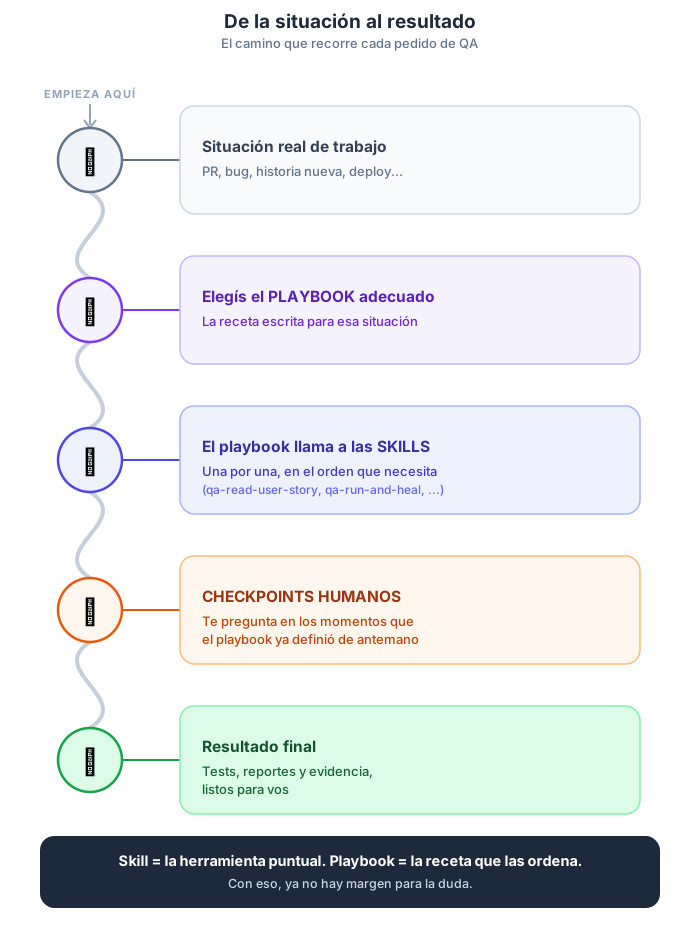
Playbooks vs. Skills — A guide to understanding the difference
This guide is meant for anyone, with no technical or programming knowledge, who needs to understand two words they'll hear all the time when working with the QA assistant (whichever model they use): "skill" and "playbook".
By the time you finish reading it, you'll be able to answer, without hesitation:
- What is a skill?
- What is a playbook?
- How are they similar and how are they different?
- Which one do I use in each situation?
1. The idea in a single sentence
Think, for example, of the checklist a chef follows before preparing a dish: they don't improvise every time, they follow a proven sequence of steps. A playbook is that same idea applied to testing an application: a written recipe that tells the AI model, step by step, what to do using different elements/tools called "Skills".
What is a "Skill"?
A skill is the specific tool that carries out each step of the playbook. It interacts with the playbook — the assistant takes care of using the right tool at each moment.
2. The kitchen analogy
Think of a cook preparing a dish.
| In the kitchen | In our project |
|---|---|
| An individual utensil or technique: cutting, whisking, baking | A skill: a specific, specialized task |
| A complete recipe: "Chocolate cake — step by step" | A playbook: a guide that chains several skills in order, for an end-to-end goal |
| The cook chooses the recipe based on what they want to achieve (a birthday, a quick dinner) | You choose the playbook based on the situation (a new story, a bug, a frontend PR) |
| The recipe tells you "first cut, then whisk, then bake" | The playbook tells you "first read the story, then plan, then test, then report" |
Nobody uses "cutting" as if it were the whole dish. And nobody follows a recipe without, deep down, cutting, whisking, and baking at some step. A playbook doesn't replace the skills — it organizes them.
3. What is a skill?
A skill is a specific, specialized task that the assistant knows how to do very well. It does just one thing, does it well, and returns a concrete result.
Characteristics of a skill
- It solves a single step of a bigger job (not a complete process).
- It's invoked with a specific command, for example
/lippia-neo-read-user-story. - It receives some input data (for example, the path to a file) and delivers a concrete result (for example, a summary).
- It doesn't decide "what comes next" — that's the job of the playbook or of whoever invokes it.
Real example: the lippia-neo-read-user-story skill
It's the skill that reads a user story (the document that describes a feature to test) and extracts the essentials from it:
- A summary in simple language.
- The list of acceptance criteria (what the feature has to meet to be considered correct).
- The application URL and the test credentials, if they're mentioned.
- The key features to test.
You give it a file or a link to a ticket (Jira / Azure DevOps), and it returns that information already organized. It doesn't plan tests, it doesn't explore the app, it doesn't generate tests — other skills do that, afterwards.
Other examples of skills in the project
| Skill | What it does, in one simple sentence |
|---|---|
lippia-neo-bootstrap-stack |
Analyzes a new project and detects which testing tools it works with |
lippia-neo-relay-human-approval |
Passes along a human approval decision for an artifact previously generated in a plan |
lippia-neo-reproduce-bug |
Checks whether a bug is reproducible; navigates the live application using Playwright. |
lippia-neo-build-plan-input |
Used after lippia-neo-classify-task has chosen a plan and before running it — it takes the text of the original task and builds the input JSON that the plan needs to run; if it doesn't get a required key, it asks a human for it instead of running the plan with incomplete input. |
lippia-neo-ci-bootstrap |
Used when you need a CI/CD workflow that runs the QA tests. |
lippia-neo-classify-task |
Classifies a free-text task by comparing it against a list of available execution plans and returns the name of the plan that best matches. |
lippia-neo-classify-ui-scope |
Used as step 0 of the "M2 classifier-driven UI regression" plan to route the execution to the smoke branch or the full regression branch. |
lippia-neo-create-test-plan |
Based on that story, puts together a step-by-step test plan |
lippia-neo-fetch-user-story |
Fetches a user story directly from Jira or Azure DevOps |
lippia-neo-find-existing-tests |
Right after reading a user story in a bug cycle, models the search in layers to return the matching tests and the missing cases. |
lippia-neo-generate-test-suite |
Turns the plan into automated tests, written in the project's language/framework |
lippia-neo-read-bug-report |
Used when starting QA tasks for a reported bug. |
lippia-neo-read-user-story |
Reads a user story and pulls out the essentials (summary, criteria, URL, credentials) |
lippia-neo-resolve-user-story-source |
Used when a plan or orchestrator needs to know where to read a user story reference from |
lippia-neo-run-and-heal |
Runs the automated tests and repairs the ones that fail for minor reasons (for example, a button whose name changed) |
lippia-neo-run-manual-testing |
Navigates the real application (as a person would) with the Playwright MCP browser tools, manually tests the scenarios in the plan, and records the findings in a structured way. |
lippia-neo-meta-run-user-story-e2e |
Used to run the complete 6-step QA workflow for a user story from start to finish (read story → plan → explore → generate suite → run and repair → report) |
lippia-neo-write-generation-report |
Complete report of the generated test files. |
lippia-neo-write-test-report |
Gathers all the previous results (manual exploration and automated run/repair) and writes the final report, timestamped so it never overwrites earlier reports. |
Each row of this table is a single skill, a single responsibility. None of them, on its own, does "all the QA work" — that's what playbooks are for.
The full details of each skill (what it needs, how it works step by step, what it delivers, and which playbooks it appears in) are in the Skills catalog.
4. What is a playbook?
A playbook is a step-by-step guide for a specific day-to-day situation (a new story, a reported bug, a frontend PR, an urgent hotfix). It chains several skills, in a specific order, and also defines:
- When to use that playbook (which situation it applies to).
- Which preconditions must be met before starting (for example, having a certain file ready).
- At which moments it has to pause and ask a person (you) to decide something — this is called a human checkpoint.
- What is delivered at the end (reports, test files, evidence).
In other words: the playbook is the map of the entire route, while each skill is a stop along the route.
Real example: the "Frontend UI Change PR" playbook
It's used when someone on the development team pushes a PR that modifies the interface (buttons, forms, new screens) and it has to be validated before approving it. The playbook chains the skills like this:
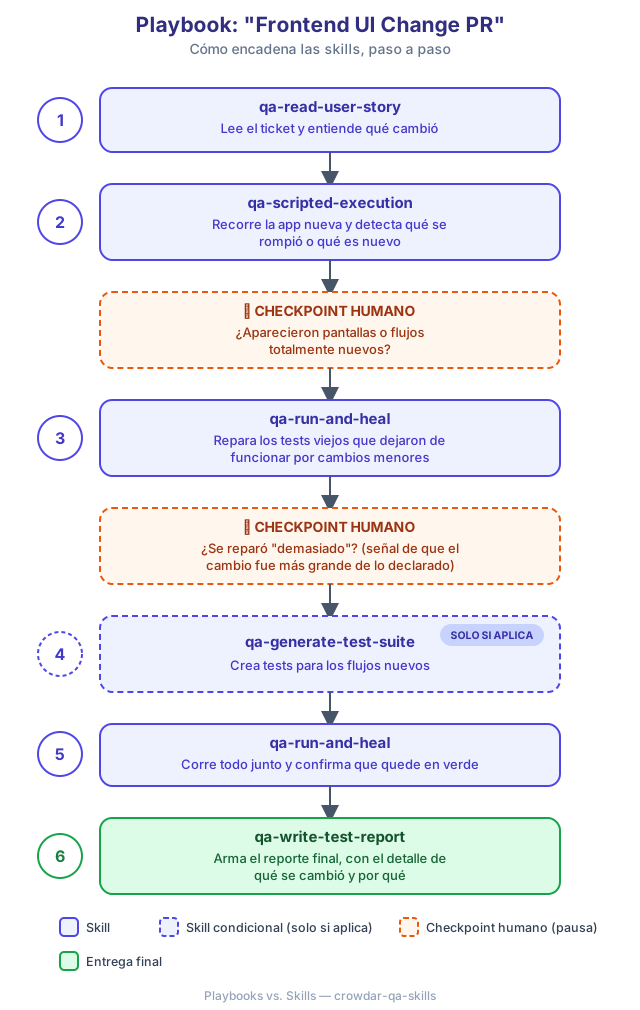
Notice that each number in the list is a different skill. The playbook doesn't "do" anything by itself — it's the guide that says in what order to use them, and at which moments to stop and ask you something.
Other examples of playbooks in the project
| Playbook | What situation it's used for |
|---|---|
feature-new-end-to-end |
A completely new user story: it builds the whole QA process from scratch |
frontend-ui-change-pr |
A PR that changes the application's visual interface |
bug-reproduction |
Someone reported a bug and you need to document how to reproduce it, with evidence |
bug-fix-cycle |
A bug that's going to be fixed: first the failing test is generated, then the developer fixes it, and it's confirmed that it was fixed |
business-rule-change |
A business rule changed (for example, a billing condition) and the affected tests need to be updated |
hotfix-fast-track |
An urgent fix that needs to be validated quickly, without holding up the emergency process |
exploratory-testing-portfolio |
You want to explore an application (or a large part of it) end to end: it discovers the areas, puts together time-boxed charters, runs the exploratory sessions, and consolidates a report |
smoke-test-post-deploy |
A new version was just deployed and you need to confirm that nothing critical broke |
new-project-bootstrap |
A project that doesn't have any QA configured yet, and you need to start from scratch |
demo-walkthrough |
Show in a demo, with explanatory pauses, how the whole process works end to end |
5. The difference, side by side
| Skill | Playbook | |
|---|---|---|
| What is it? | A specific, specialized task | A step-by-step guide for a complete situation |
| How much does it cover? | A single step | A process from start to finish (several steps) |
| What is it made of? | It doesn't use other skills — it's the smallest unit | It chains several skills, in a defined order |
| Does it decide anything on its own? | No — it only does its task and returns a result | Yes — it decides when to move on to the next step and when to pause to ask you something |
| Does it have pauses for a person to decide? | No | Yes, at the so-called human checkpoints |
| How is it invoked? | With its own command, e.g. /lippia-neo-read-user-story |
With its own command or with a natural phrase, e.g. "run the full flow for this story" |
| Example | lippia-neo-run-and-heal (runs and repairs tests) |
frontend-ui-change-pr (uses lippia-neo-run-and-heal as one of its steps) |
| Analogy | A kitchen utensil (mixer, knife) | A complete recipe (chocolate cake) |
6. How they relate to each other (visual summary)
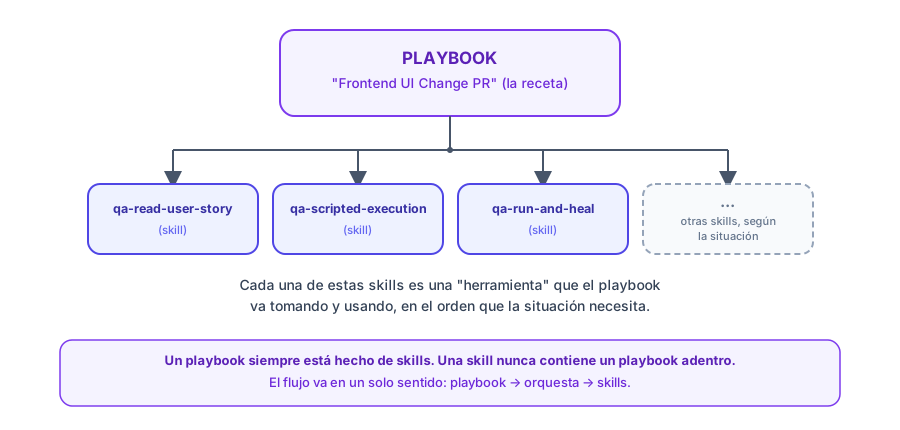
A playbook is always made of skills. A skill never contains a playbook inside it. The flow goes in one direction only: playbook → orchestrates → skills.
7. Which one do I choose?
Quick decision guide:
| Your situation | What to use |
|---|---|
| You know exactly which specific step you need (e.g.: "I just want this story read for me") | A skill directly, e.g. /lippia-neo-read-user-story |
| You have a complete situation to solve (a PR, a bug, a deploy, a new story) | A playbook, which already knows which skills to use and in what order |
| You're not sure which playbook applies | Describe the situation to your AI assistant in natural language — the assistant can help you identify the right playbook |
| It's the first time the project uses this QA flow | The new-project-bootstrap playbook, which configures everything from scratch |
When in doubt: always start with the playbook. If your case doesn't fit any of them, then it makes sense to ask for a specific skill or to ask the technical team which one should be built.
8. So you're left with no doubts: frequently asked questions
Can I use a skill without going through a playbook?
Yes. For example, if you just need a user story summarized, you can directly ask for /lippia-neo-read-user-story without running a full playbook.
Does a playbook replace the skills? No, it uses them. A playbook without skills can't do anything — it's just the guide. The skills are the ones that actually do the work.
Are human checkpoints mandatory? Yes, when the playbook defines them. They're the moment when the assistant stops and asks you for a decision before continuing (for example: "does this UI change add a new screen or not?"). Skills, on the other hand, don't have checkpoints — they do their task end to end without pauses.
How do I know whether something is a playbook or a skill? Ask yourself: "does this solve one step, or does it solve a whole situation?" If it's a specific step (read, generate, run, report), it's a skill. If it's "the complete situation I have to solve today" (a PR, a bug, a deploy), it's a playbook.
And what is a "plan"? Is it the same as a playbook?
They're similar, but not the same. Both chain skills in order to handle a complete situation. The difference is who runs it: a playbook is followed by the AI assistant (for example, Claude) together with you, with pauses for you to decide; a plan is run by the NEO engine on its own, end to end, usually from the CI pipeline and with nobody on the other side. Many plans are the automated version of a playbook. See Plans.
9. Final summary